

At Aprika, we’re committed to continuously evolving Mission Control to ensure our customers can manage their projects more efficiently and effectively. With the release of Mission Control Version 1.78, available now on the Salesforce AppExchange, we’re introducing a range of powerful new features and enhancements designed to help teams plan, execute, and deliver projects with greater control
This update introduces major new functionality in the form of the Epic Board, Create Checklist Items, and the Billing Event Generator Wizard, alongside a series of enhancements to existing tools including Resource Requests, Project Status Reports, Billing Event PDFs, and other minor updates.
Let’s dive into the highlights of this release.
Summary of New Features
- Epic Board – A new way to manage Epics, User Stories, and Actions for Agile projects, giving teams greater visibility and flexibility in delivery.
- Create Checklist Items – A streamlined interface for creating and editing multiple checklist items in bulk, improving productivity and consistency.
- Billing Event Generator Wizard – Enhancements including a new T&M Wizard and Manual Tab for more control over invoice creation.
- Resource Request Enhancements – Expanded support to include Resource Requests directly from Opportunities.
- Project Status Report Enhancements – New controls for display options, anonymization of resource names, and an optional Expense Appendix.
- Billing Event PDF Enhancements – Greater flexibility in sourcing and formatting invoice addresses.
- Minor Enhancements – Including Phase Field rollups, checklist item status automation, sprint team validation rules, and custom expense mark-up options.
Epic Board: Agile Project Management Reimagined
The Epic Board is one of the most exciting additions in this release. It provides a central hub for managing Epics, User Stories, and Actions, offering project managers and Agile teams a dynamic and contextual view of their work.
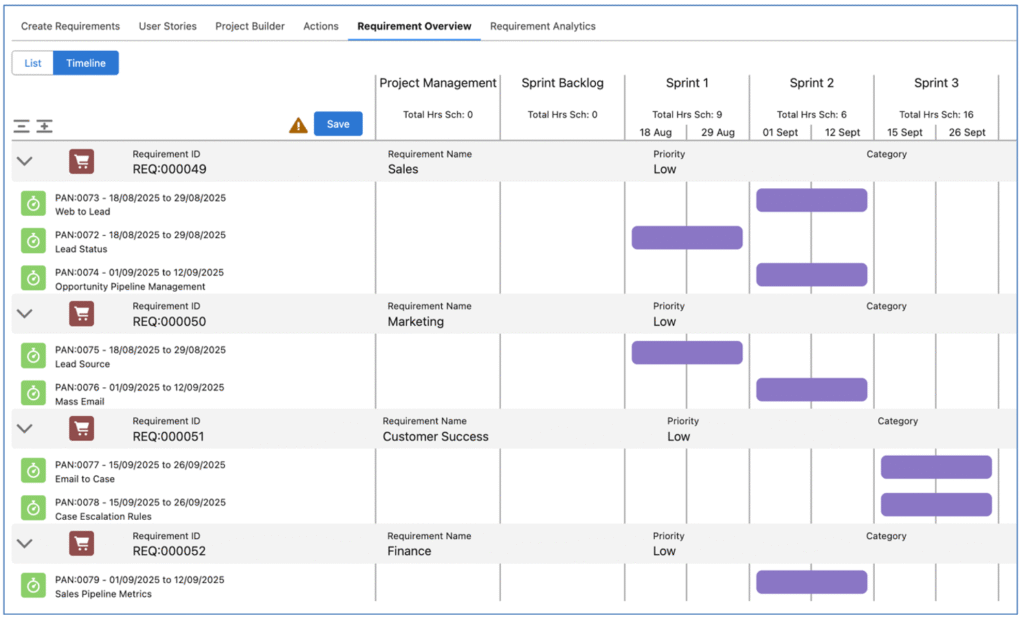
Traditionally, Actions spread across multiple milestones could obscure which Epics they belong to. The Epic Board resolves this by letting users see how Actions relate both to Epics (Requirements) and to Sprints (Milestones). This dual perspective ensures stakeholders can track business-critical outcomes while maintaining alignment with delivery schedules.
Key benefits include:
- Flexible Hierarchy: Choose to create User Stories first (for scoping and client approval) or go straight from Epic to Action.
- Drag-and-Drop Planning: Convert User Stories into Actions and allocate them into Sprint Milestones with ease using the Project Builder tab.
- Requirement Overview & Timeline Views: Gain powerful visual insight into Epics, Milestones, and Actions, including Gantt-style charts and nested lists.
- Requirement Analytics: Track burn down, velocity, and logged hours across roles, functions, and milestones with built-in analytics dashboards.
By grouping Actions into Epics, businesses can retain valuable context such as departmental ownership or functional alignment while keeping delivery firmly tied to project timelines. The Epic Board provides the ideal balance between high-level strategic visibility and actionable sprint planning.
Create Checklist Items: Streamlined Task Management
Version 1.78 introduces the Create Checklist Items page, a new feature that simplifies the creation and management of multiple checklist items in one interface.
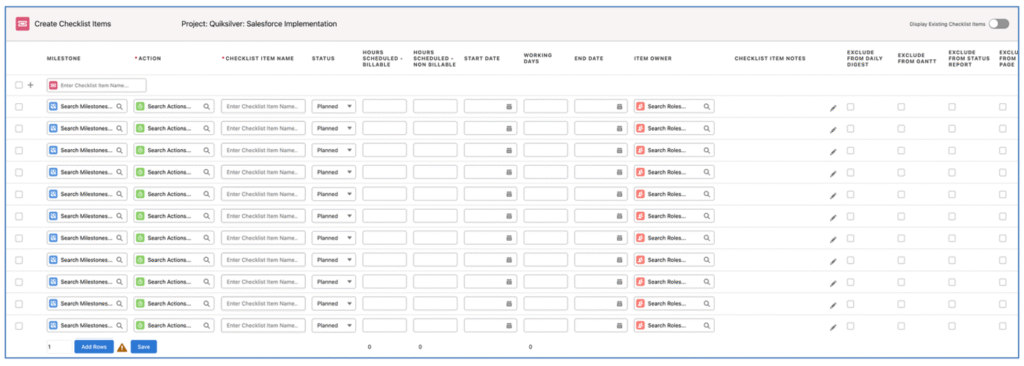
Previously, checklist items were added individually, making it time-consuming to set up detailed work breakdowns. With this enhancement, teams can now:
- Add Multiple Items Quickly: Use the “Add Rows” or “Quick Add” options to create many checklist items at once.
- Bulk Edit with Multi-Line Editing: Apply updates such as ownership or due dates across multiple items simultaneously, reducing repetitive work.
- Copy Item Owner: Easily replicate ownership from one row to another for consistency.
- Customize Fields Displayed: Choose which fields are visible and editable via a configurable field set.
This feature is accessible directly from Project, Milestone, and Action layouts, meaning you can build out detailed sub-tasks exactly where you need them. With support for up to 200 checklist items per project, this update makes managing granular tasks faster, more consistent, and far less error-prone.
The result? Teams save time, reduce admin overhead, and ensure every detail of the project plan is accounted for.
Billing Event Generator: Smarter, More Flexible Invoicing
Billing is at the heart of any professional services business, and Version 1.78 delivers significant improvements with the new Billing Event Generator enhancements.

Two major additions stand out:
1. Time & Materials (T&M) Wizard
The T&M Wizard enables project managers to manually create invoices based on approved but uninvoiced time logs and expenses. Unlike automatic periodic billing, this method gives teams full control over:
- Which time logs and expenses to include.
- The date ranges used for invoicing.
- How items are grouped (by milestone, action, or role).
The result is more accurate billing, with the flexibility to tailor invoices to customer agreements while maintaining transparency.
2. Manual Tab
The Manual Tab allows the creation of a billing event and multiple billing items in a single interface. This option is ideal for projects with unique billing requirements that don’t align with standard automated cycles.
Benefits of these enhancements include:
- Greater Accuracy: Review logs and expenses before invoicing.
- Flexible Grouping: Align invoices to the level of detail your client needs.
- Customizable Fields: Configure which fields display in each step of the wizard.
- Improved Cash Flow: Ensure billable time and costs are captured and invoiced promptly.
Together, these updates make Mission Control an even more powerful tool for managing financials within projects, reducing revenue leakage and strengthening client trust.
Other Enhancements in Version 1.78
In addition to these headline features, Mission Control 1.78 includes a host of smaller yet impactful improvements:
- Resource Request Enhancements: Resource requests can now be created directly from Opportunities, streamlining forecasting before projects are even live.
- Project Status Report Enhancements: Users can now customize which summary sections display, anonymize resource names, and include an optional expense appendix for greater stakeholder clarity.
- Billing Event PDF Enhancements: More options for sourcing and formatting invoice addresses, giving finance teams the flexibility to align invoices with client requirements.
- Minor Enhancements: Including phase budget rollups, checklist item status automation, sprint team validation rules, and custom mark-up amounts for expenses.
Conclusion
The release of Mission Control Version 1.78 marks another step forward in empowering project teams with the tools they need to deliver projects more effectively. From the Epic Board that brings Agile visibility to complex projects, to the Create Checklist Items interface that streamlines task setup, and the Billing Event Generator Wizard that enhances billing accuracy and flexibility—this release is packed with value for every user.
Combined with the broader set of enhancements, these updates reinforce Mission Control’s role as the leading Salesforce-native Project Management and PSA solution.
If you’d like to learn more, view the pre-recorded “What’s New” webinar available in the Version 1.78 Release Notes
Mission Control is a comprehensive Salesforce Project Management software application. Make sure you check out our other Project Management Best Practices.
📌 Ready to upgrade? Version 1.78 is now available on the Salesforce AppExchange.


